Usage
There is one main subcommand you will use: dep ensure. ensure first checks that Gopkg.lock is consistent with Gopkg.toml and the imports in your code. If any
changes are detected, dep’s solver works out a new Gopkg.lock. Then, dep checks if the contents of vendor/ are what Gopkg.lock (the new one if applicable, else the existing one) says it should be, and rewrites vendor/ as needed to bring it into line.
In essence, dep ensure works in two phases to keep four buckets of state in sync:

Note: until we ship vendor verification, we can’t efficiently perform the Gopkg.lock <-> vendor/ comparison, so dep ensure unconditionally regenerates all of vendor/ to be safe.
dep ensure is safe to run early and often. See the help text for more detailed
usage instructions.
$ dep help ensure
Installing dependencies
(if your vendor/ directory isn’t checked in with your code)
$ dep ensure
If a dependency already exists in your vendor/ folder, dep will ensure it
matches the constraints from the manifest. If the dependency is missing from
vendor/, the latest version allowed by your manifest will be installed.
Adding a dependency
$ dep ensure -add github.com/foo/bar
This adds a version constraint to your Gopkg.toml, and updates Gopkg.lock and vendor/. Now, import and use the package in your code! ✨
dep ensure -add has some subtle behavior variations depending on the project or package named, and the state of your tree. See dep ensure -examples for more information.
Changing dependencies
If you want to:
- Change the allowed
version/branch/revision - Switch to using a fork
for one or more dependencies, do the following:
- Manually edit your
Gopkg.toml. Run
$ dep ensure
Checking the status of dependencies
Run dep status to see the current status of all your dependencies.
$ dep status
PROJECT                             CONSTRAINT     VERSION        REVISION  LATEST
github.com/Masterminds/semver       branch 2.x     branch 2.x     139cc09   c2e7f6c
github.com/Masterminds/vcs          ^1.11.0        v1.11.1        3084677   3084677
github.com/armon/go-radix           *              branch master  4239b77   4239b77
On top of that, if you have added new imports to your project or modified Gopkg.toml without running dep ensure again, dep status will tell you there is a mismatch between Gopkg.lock and the current status of the project.
$ dep status
Lock inputs-digest mismatch due to the following packages missing from the lock:

PROJECT                         MISSING PACKAGES
github.com/Masterminds/goutils  [github.com/Masterminds/goutils]

This happens when a new import is added. Run `dep ensure` to install the missing packages.
As dep status suggests, run dep ensure to update your lockfile. Then run dep status again, and the lock mismatch should go away.
Visualizing dependencies
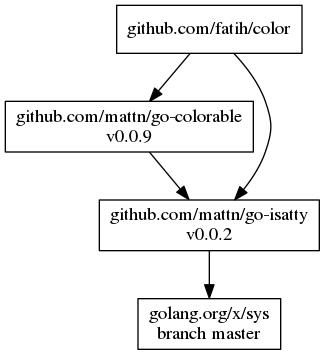
Generate a visual representation of the dependency tree by piping the output of dep status -dot to graphviz.
Linux
$ sudo apt-get install graphviz
$ dep status -dot | dot -T png | display
MacOS
$ brew install graphviz
$ dep status -dot | dot -T png | open -f -a /Applications/Preview.app
Windows
> choco install graphviz.portable
> dep status -dot | dot -T png -o status.png; start status.png
Updating dependencies
Updating brings the version of a dependency in Gopkg.lock and vendor/ to the latest version allowed by the constraints in Gopkg.toml.
You can update just a targeted subset of dependencies (recommended):
$ dep ensure -update github.com/some/project github.com/other/project
$ dep ensure -update github.com/another/project
Or you can update all your dependencies at once:
$ dep ensure -update
“Latest” means different things depending on the type of constraint in use. If you’re depending on a branch, dep will update to the latest tip of that branch. If you’re depending on a version using a semver range, it will update to the latest version in that range.
Removing dependencies
- Remove the
imports and all usage from your code. - Remove
[[constraint]]rules fromGopkg.toml(if any). Run
$ dep ensure
Testing changes to a dependency
Making changes in your vendor/ directory directly is not recommended, as dep
will overwrite any changes. Instead:
Delete the dependency from the
vendor/directory.rm -rf vendor/<dependency>Add that dependency to your
GOPATH, if it isn’t already.$ go get <dependency>Modify the dependency in
$GOPATH/src/<dependency>.Test, build, etc.
Don’t run dep ensure until you’re done. dep ensure will reinstall the
dependency into vendor/ based on your manifest, as if you were installing from
scratch.
This solution works for short-term use, but for something long-term, take a look at virtualgo.
To test out code that has been pushed as a new version, or to a branch or fork, see changing dependencies.